Utility payment
Pay bills back home from your wallet
Use your City Wallet balance to pay utility bills in your home country straight from Japan — no need for family to queue at a counter.
Select the country
Utility payment is currently available for Nepal.
Electricity
Water
Internet
Mobile recharge
How it works
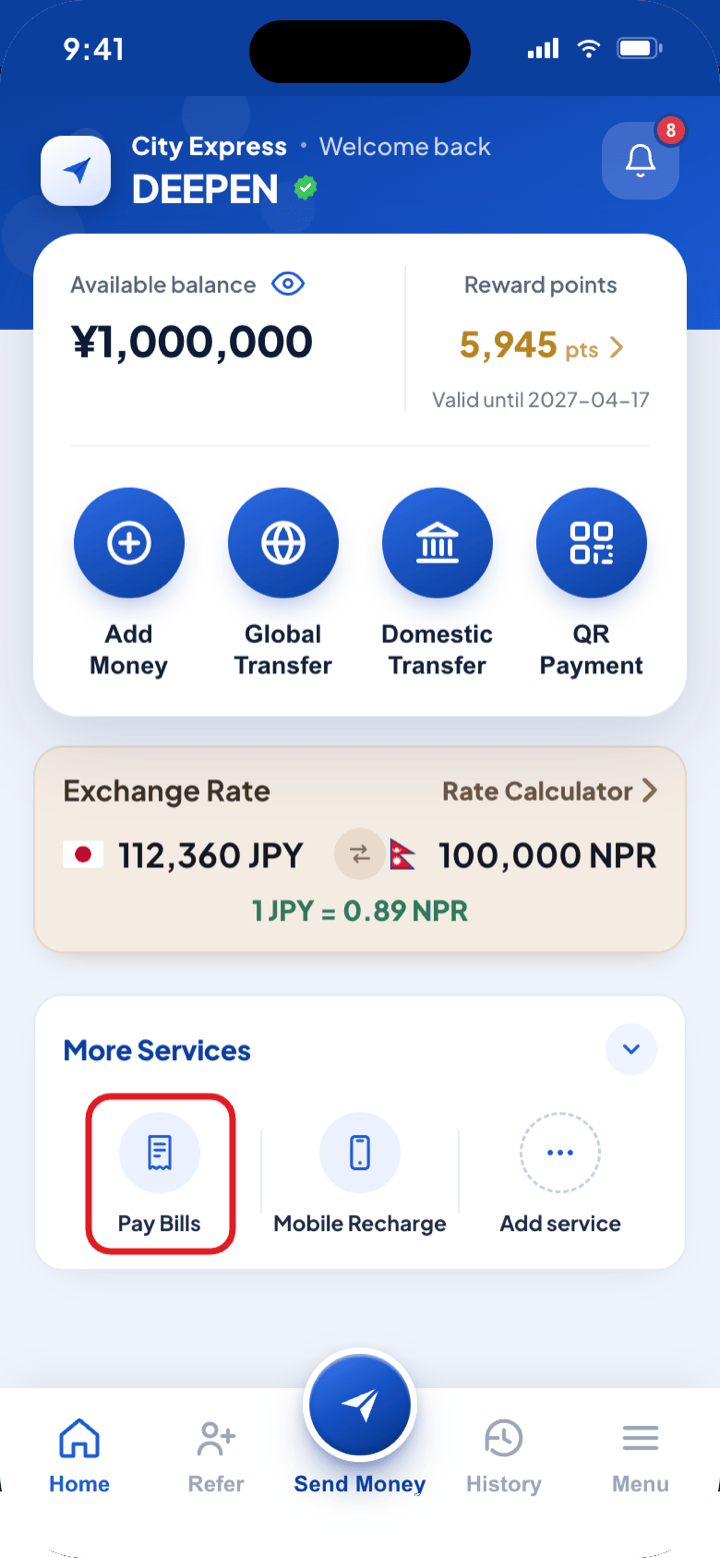
1On the app home screen, tap Pay Bills under More Services.
2Choose the country and biller, then enter the customer or bill number.
3Check the amount and confirm — it’s paid from your City Wallet balance.
Five steps from your City Wallet balance to a paid bill back home.
Step 1
1
Open Pay Bills
- i.Log in to the City Express app and open the home screen.
- ii.Under More Services, tap Pay Bills.
Step 2
2
Choose the country and bill type
- i.Select the country at the top of the screen (currently Nepal).
- ii.Tap the bill you are paying — Electricity, Water, Internet and more.
App screenshot coming soon
Step 3
3
Enter the biller and account number
- i.Pick the biller — the power company, provider, etc. — from the list.
- ii.Enter the customer or bill number printed on the bill.
App screenshot coming soon
Step 4
4
Check the amount
- i.The bill amount is shown together with the yen amount and fee to be deducted.
- ii.If your balance is short, add money to your City Wallet first.
App screenshot coming soon
Step 5
5
Confirm and pay
- i.Review the details and confirm — the bill is paid from your City Wallet balance.
- ii.Your receipt is saved under History at any time.
App screenshot coming soon